
Facebook page visibility on search engines:
If your firm’s Facebook page isn’t appearing in Google search results, you’re not alone. Visibility issues can stem from simple settings, incomplete profiles, or indexing limitations. The good news: most of these problems are easy to fix with a few targeted checks and updates. First, check and optimize your Facebook page:
- Confirm your Page doesn’t have age or country restrictions.
- Check your Page is published and active.
- Confirm your Page has a profile picture, cover photo and an action button.
- Make sure you’ve added basic info to the About section of your Page.
How to delete country or age restrictions:
Restrictions can unintentionally block search engines from accessing your page, which directly impacts visibility. Removing them ensures your content is publicly accessible and indexable. To access this feature:
- Click your Page’s profile picture on Facebook.
- Click Settings & Privacy, then click Settings.
- In the left menu, click Followers and public content.
- Click Edit next to Country Restrictions or Age Restrictions.
- Delete All Restrictions (Important).
Optimize the Firm’s About section
Your About section plays a key role in how search engines understand your business. A complete, keyword-rich description improves your chances of appearing in relevant searches. Add information about your law firm. Include the full firm name and any abbreviations. In this section you can include links to the firm’s other social media profiles, do that!
You can edit the About section under your profile > Details about you OR via Audience and visibility > Page details.
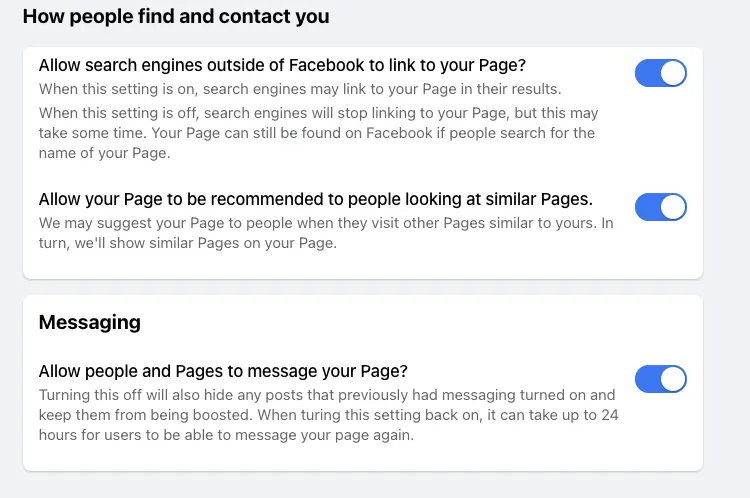
Check that the Facebook page search engines are ON
Facebook allows you to control whether search engines can link to your page. While this setting is typically enabled by default, it’s worth confirming it hasn’t been turned off.
To check, go to Audience and visibility > How people can find and contact you, and ensure search engine linking is enabled.
Submit a verification form
If everything appears correct but your page still isn’t showing up, it may require manual review. Submitting a request to Meta can help identify any hidden issues affecting visibility. Fill out the verification form with the documents requested and explain the problem. Talk to the Meta team to see if they find any other potential issue with the page visibility and confirm there is no other issue. Take screenshots and use them to fill out the report if necessary.
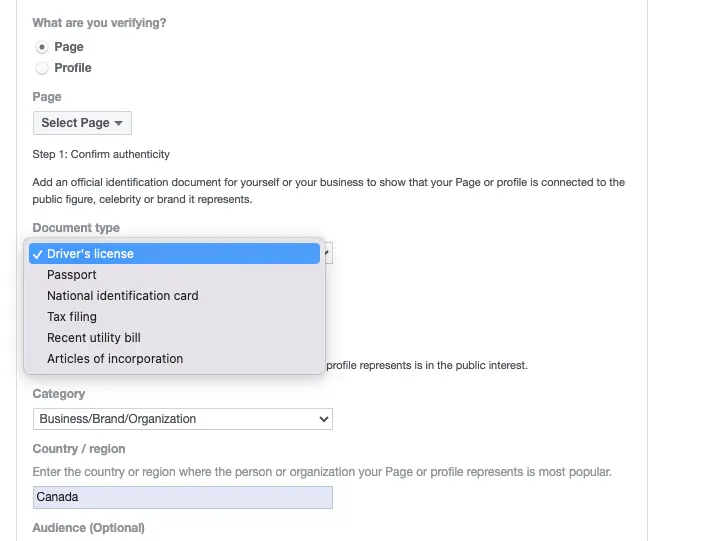
If this doesn’t work and the page is still not showing up, click on “Reporting a Problem with Facebook”.
Additional tips
Beyond Facebook settings, there are a few extra steps that can improve discoverability across platforms. These small actions can reinforce your firm’s digital footprint and help search engines connect the dots.
Don’t forget to…
- Add social media profiles (like Facebook) to your firm’s Google Business Profile.
- When you post on Facebook and Instagram consider if it’s appropriate to use hashtags for your firm e.g., #Firmname.
If your Facebook page isn’t showing up in Google, it’s usually a fixable issue, not a permanent one. By reviewing your settings, optimizing your content, and ensuring your page is fully accessible, you can significantly improve your visibility.
Need help diagnosing or optimizing your firm’s online presence? Reach out! We’re happy to take a closer look and help you get found where it matters most.

